
Building an iOS Shortcut That Turns Food Photos Into Meal Logs (and the Bugs I Learned From)
I’ve been trying to make my daily food logging frictionless.
The dream was simple: whenever I take (or pick) a photo of food, I want one tap to send that photo to my own remote API and create a meal record automatically. No manual typing, no copy/paste, no opening another app.
In practice… iOS Shortcuts can be both magical and painfully fiddly 😅
This post is my learning log: how I built a Shortcut that triggers from an image, extracts the photo timestamp, infers the meal type (breakfast/lunch/dinner/snack), and calls my API POST /add_meal with a base64 photo payload. I’ll also walk through the weird issues I ran into—and what finally made everything click.
The Goal
My backend API accepts a JSON body like this:
{
  "photo_base64": "data:image/jpeg;base64,/9j/4AAQSkZJRgABAQAAAQ...",
  "timestamp": "2024-09-01T13:00:00Z",
  "meal_type": "lunch"
}
So the Shortcut needed to do four things:
-
Trigger from a photo (Share Sheet / “Select Photo”).
-
Read the photo’s capture time.
-
Infer
meal_typebased on the hour:- morning → breakfast
- noon → lunch
- evening/night → dinner
- otherwise → snack
-
Call
POST /add_mealwith the image encoded as base64.
The First Surprise: Shortcuts Are “Low-Code,” But Still Very Manual
I knew Shortcuts could do this, but the experience felt more like wiring a circuit board than writing code:
- each tiny action is a block,
- variables jump around between blocks,
- the “input” and “output” type system is… kind of implicit,
- and you can accidentally pass the wrong thing to the next step without realizing it.
At first I accepted that this would be a “drag-and-drop” project with lots of manual tweaking.
Then I had a thought:
Can I define the Shortcut with code instead?
I wanted something more maintainable: ideally the Shortcut is just a trigger + data handoff, while the actual logic lives in code.
So… I asked ChatGPT.
ChatGPT’s First Answer Was… Too Complex
My first conversation with ChatGPT gave me a pretty heavy solution. It worked in theory, but it felt like overengineering for a personal logging tool.
What I really wanted was:
- keep the Shortcut minimal,
- push the real logic into a scripting environment I’m comfortable with.
That’s when I switched to a simpler approach:
Use Shortcuts for the UI + input
and use Scriptable (JavaScript) for the logic + API call.
As a programmer, JavaScript feels natural. Debugging is easier. Iterating is faster. And I don’t have to fight Shortcuts’ variable system for everything.
The Architecture That Finally Made Sense
Shortcut responsibilities
- Get the image.
- Extract the photo capture date.
- Format the date properly.
- Pass timestamp + image into Scriptable.
Scriptable responsibilities
- Parse timestamp → compute hour → infer
meal_type. - Convert image to base64 (as JPEG).
- Send the POST request.
- Return output back to Shortcut.
This split kept the Shortcut “thin” and the code “thick,” which is exactly what I wanted.
The Weirdest Part: Shortcut Inputs Kept Betraying Me
The hardest issue wasn’t the API call.
It was: inputs inside “Run Script” were confusing and easy to break.
In the “Run Script (Scriptable)” action, you can pass:
- a “with” parameter (Shortcut Parameter),
- images,
- files,
- texts…
But the types don’t always behave how you expect, and it’s easy to accidentally pass a photo file URL when you thought you passed a date string.
At one point, my script threw:
Invalid timestamp: file:///var/mobile/tmp/...IMG_9568.heic
That means my script tried to parse the timestamp—but the “timestamp” was literally the image file path. 🤦♂️
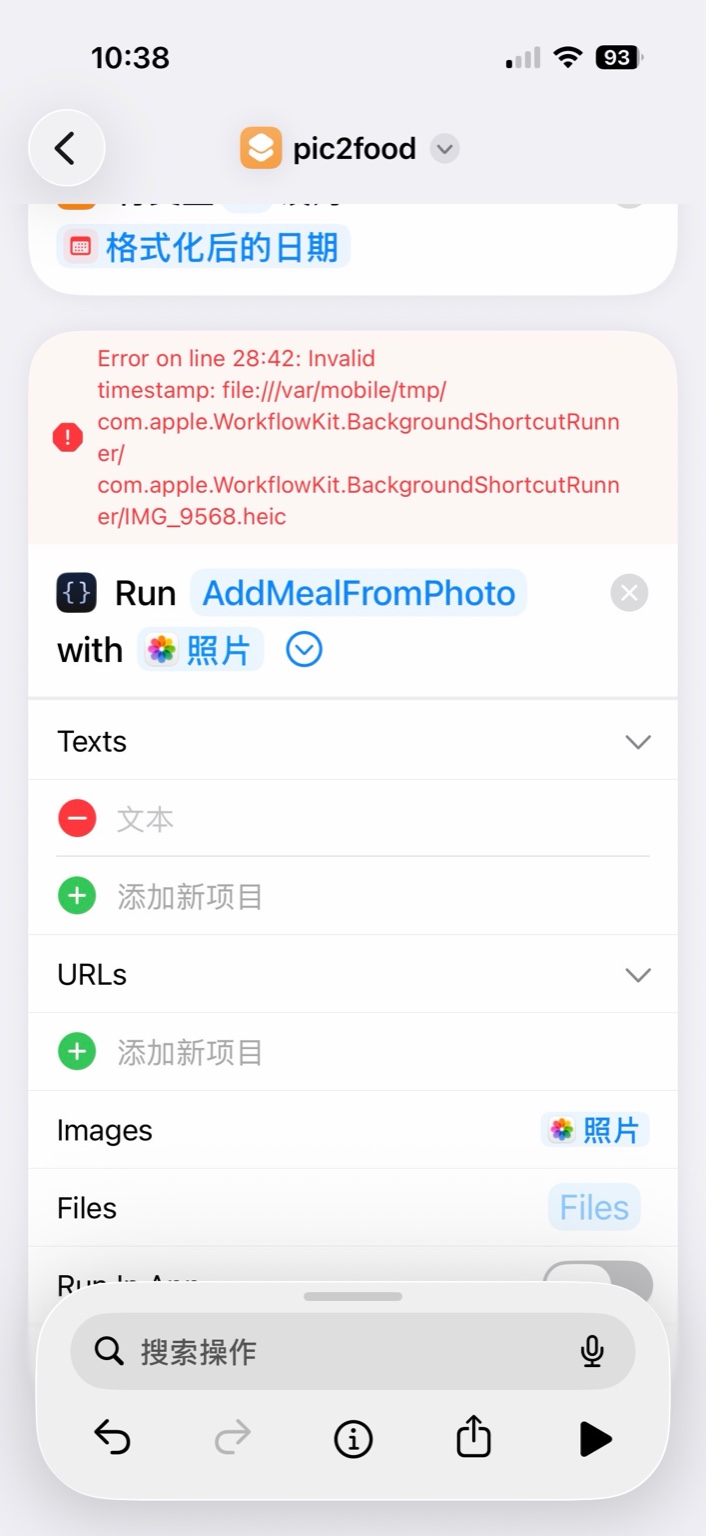
What I learned
In Shortcuts, wiring matters more than you think:
- the
withparameter should be timestamp - the
Imagesfield should receive the photo - don’t rely on the “Texts” list unless you’re sure it actually saved your variable
Once I forced myself to follow a single rule—timestamp via “with”, image via “Images”—things stopped randomly collapsing.
Another Trap: jpegData() Doesn’t Exist in Scriptable
I initially used something like:
img.jpegData(0.8)
But Scriptable’s Image object is not UIImage.
So I got errors like:
jpegData is not definedimg.jpegData is not a function
The correct Scriptable way is:
const jpeg = Data.fromJPEG(img)
const photo_base64 = "data:image/jpeg;base64," + jpeg.toBase64String()
Even if the original input is HEIC, this works because Scriptable decodes it into an Image, then re-encodes it as JPEG.
So “HEIC input” is not a problem—as long as you are working with Image, not a file URL.
The Timestamp Bug: My Meal Type Was Wrong
After I fixed the input wiring and image encoding, I thought I was done.
But the meal type classification was still wrong.
Breakfast photos were becoming “snack,” lunch photos became “breakfast”… I felt cursed 😭
Then I realized the root cause:
The timestamp I passed wasn’t a proper ISO 8601 datetime with time.
I was formatting the date in a way that looked okay visually, but didn’t reliably parse into new Date(timestamp) in JavaScript.
Once I formatted the capture date as ISO 8601 including time, everything snapped into place.
In Shortcuts, that means: when using “Format Date,” make sure it produces something like:
2024-09-01T13:00:00Zor2024-09-01T13:00:00-07:00
(Offset timezones are fine too—just stay ISO compliant.)
Once I fixed that, getHours() returned the correct hour, and my meal_type logic worked.
The Final Working Flow
Now the pipeline looks like this:
-
Select / Share a photo
-
Shortcut extracts “Date Taken”
-
Shortcut formats it as full ISO 8601 (with time)
-
Shortcut runs Scriptable:
- timestamp passed via “with”
- photo passed via “Images”
-
Scriptable:
- computes meal type
- converts image to JPEG base64
- calls my remote API
- returns a JSON result back to Shortcut
And finally… it works 🎉🥹
The first time the backend successfully logged a meal from just a photo, I felt genuinely happy. It wasn’t just automation—it was the feeling that I had bent the system to fit my life.
What I Took Away
This project taught me a few surprisingly deep lessons:
- Shortcuts is powerful but fragile: variable wiring matters.
- Minimize what you do in Shortcuts: keep it as a trigger + pre-processing layer.
- Move complex logic into code: Scriptable made everything easier to maintain.
- Always use ISO 8601 with time if your logic depends on hours.
- Debugging isn’t only about code—sometimes it’s about the “plumbing.”
Next Steps
I’m thinking of adding:
- a confirmation UI (“Detected lunch—override?”)
- retries / offline queueing
- smarter classification based on both time and image content
But for now, I’m just enjoying the small win: a personal “photo → meal log” pipeline that actually feels effortless.